MSTRPUTRR
ELRS/CRSF telemetry widget for EdgeTX 2.8+ colour radios
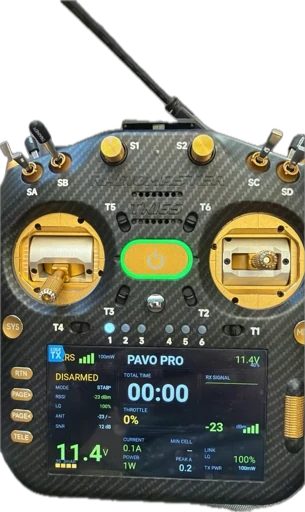
Multirotor / FPV telemetry widget for EdgeTX, tuned for quads with ELRS/CRSF telemetry and Betaflight battery sensors.
Target: RadioMaster TX16S MK3 and similar EdgeTX 2.8+ colour radios
Version: v3.6-lvgl
⚡ Battery telemetry overhaul
What's New in v3.6
Battery telemetry overhaul — this release reworks the battery side around voltage, since it's the sensor you can actually trust. New chemistry detection, percentage voice callouts, a voltage-based time-to-land estimate, and the on-screen gauge now reads real voltage instead of the flight controller's fuel gauge.
New Features
- LiPo / Li-HV auto-detection: Sets the correct "full" reference per chemistry (4.20 vs 4.35 V/cell). Auto-detects Li-HV when it sees a cell above 4.26 V; force it with
cellChem = "lipo" | "lihv"if you fly already-used HV packs (they're indistinguishable from a full LiPo below that voltage). - Percentage voice callouts at 80 / 70 / 60% (
pctMarks): Latched once each per pack, triggered on resting voltage so a punch doesn't false-fire, and seeded at arm so a half-charged pack won't announce marks it launched below. - Time-to-land estimate via resting-voltage slope — works with no current sensor. Shown as
m:sson the battery block, suppressed above 85% where the discharge curve is too flat to be meaningful.warnModesetting:"percent","time", or"both"for what the callouts speak. - Worn-pack sag alert: Flags a tired/undersized pack from excess resting-vs-loaded sag, evaluated only in a moderate-throttle window so hard punches don't trip it. Toggle with
sagAlert. - On-screen chemistry label on the battery block.
Changed
- Battery %-gauge (bar + header number) now reads our resting-voltage %, not the FC's Bat%. The header % is chemistry-aware and color-coded by level. The FC value is still used for its own spoken warning. Note: the bar tracks the LiPo/Li-HV voltage curve, so it holds high early and drops faster in the last third — this is correct, not a fault.
- Critical/warning voltage alerts (3.50 / 3.30 V/cell) now use resting voltage (
restingBattWarn), eliminating false "danger" callouts during punches.
Fixed
- Cell-count detection mis-read Li-HV packs — a full 6S Li-HV (26.1 V) was detected as 7S. Detection now uses the Li-HV ceiling and counts both chemistries correctly.
Known Limitation
mAh / power figures remain only as accurate as the FC's current-sensor calibration (ibata_scale). The mAh readout is kept as a fallback but the voltage gauge is the trustworthy source until that's calibrated.
Config
All new behavior is tunable at the top of cfg — cellChem, pctMarks, warnMode, restThrottlePct, sagAlert, and friends. If you're upgrading from v3.2, check the config section for new fields.
Features
Voltage-based telemetry, LiPo/Li-HV auto-detection, percentage callouts at 80/70/60%, time-to-land estimate
Auto-detects LiPo (4.20V) vs Li-HV (4.35V) packs, force with cellChem config
LQ% and RSSI (dBm) warnings with separate thresholds, RSSI sparkline graph
Adaptive timer display: flight → last flight hold → total time
Smart voice callouts: battery %, low voltage, signal loss, link quality drops (latched, no spam)
Real-time current draw, power (watts), mAh used, peak tracking
Requirements
- EdgeTX 2.8+ colour radio (TX16S MK3, etc.)
- ELRS/CRSF receiver with telemetry enabled
- Betaflight battery sensors:
RxBt,Curr,Capa,Bat% - ELRS sensors:
RQly,RSNR,1RSS,2RSS,TPWR - Arm switch configured (default: SF / CH5)
All sensors are optional — missing ones show -- and are skipped by voice.
Installation
Use the form below to get the Lua file.
SD:/WIDGETS/MSTRPUTRR/Place main.lua inside the folder:
SD:/WIDGETS/MSTRPUTRR/main.luaOn the radio, go to: DISPLAY → Add widget → Select MSTRPUTRR
Use App mode or full-screen for best experience.
Edit the cfg section at the top of main.lua to tune:
- Cell voltage warning thresholds
- LQ / RSSI warning levels
- Arm switch source
- Voice callout preferences
Download
Support
Found a bug or have a feature request? Reach out:
- Instagram: @masterputterrer
- Buy me a coffee if this widget saved your quad!